For Atlas Van Lines agents
Connect your Atlas business. Run every line of business. Put AI to work.
Bring Atlas work into the same platform that runs your independent business. Less re-keying, one place for every job, from the first lead to the final invoice.



Everything Atlas sends,
right where you work
Your office stops copying orders out of the Atlas portal. Each piece lands on the right project, ready for sales, dispatch and accounting.
Orders become projects
Enter the Atlas order number. Shipper, addresses, dates, agents, driver, weight and estimated charges come in, and the project builds itself.
Leads, linked
Import by Atlas Business ID with contact details, addresses, move date and stage, such as Estimated or Booked, tied to the matching project.
Shipment paperwork
The bill of lading and other shipment documents attach to the project. You decide whether your crew can see them.
Settlements, booked
Upload the weekly settlement. Supermove creates the statement, the order-by-order abstract, project billing for your share and vendor bills for deductions.
Then put AI to work.
Your Autopilot advantage.
Autopilot turns plain-English questions into answers, reports and automated actions using your business data, while your team stays in control of key decisions.
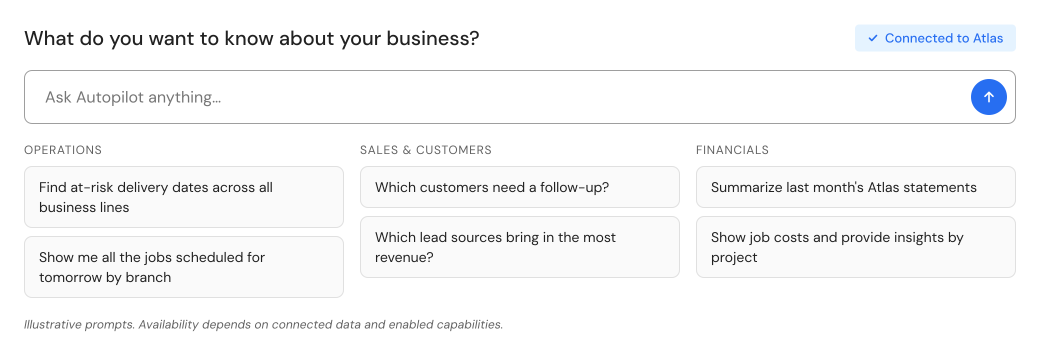
Ask
Answers from your data, including invoice and project audits.
Insights
A question becomes a saved report, emailed on a schedule.
Claims
Intake, photo follow-up and triage, with your team approving.
Operations
Confirm details, flag gaps and keep jobs moving.
Crews
Day-of updates and job paperwork for your crews.
Accounting
Overdue-invoice reminders and billing issues flagged for review.
The next era of moving
isn't just connected.
It's intelligent.
Bring an Atlas order number. We'll show you the import, your Atlas and independent jobs in one place, and Autopilot working on them.
*Supermove's Atlas integration supports leads, orders, documents and statements. Imported Atlas orders become Supermove projects that work with Autopilot. Autopilot Insights is enabled per company and uses Autopilot credits. Some agents shown are in development. Product views are illustrative; functionality depends on available data, configuration and enabled workflows.