For Allied and North American agents
Connect your Sirva business. Run every line of business. Put AI to work.
Supermove brings your Allied and North American work together with the rest of your business, then puts AI to work across it. No re-keying, one place for every job, from the first lead to the final statement.



Everything Sirva sends,
right where you work
Your office stops re-keying Sirva work into another system. Orders arrive on their own and each piece lands on the right project, ready for sales, operations and accounting.
Orders become projects
Enter the Atlas order number. Shipper, addresses, dates, agents, driver, weight and estimated charges come in, and the project builds itself.
Leads
Sirva leads land in your sales pipeline next to your own, so every opportunity is worked in one place.
Surveys and rating
Surveys done in MoveScout Pro and Sirva rating data come through with the order, ready for your team.
Documents
Sirva order documents stay with the job, next to your customer paperwork.
Abstracts
See what Sirva plans to pay on each order and compare it with what you recorded on the project.
Statements
Sirva statements sit alongside invoicing, payments and accounting, ready for Autopilot to analyze.
Then put AI to work.
Your Autopilot advantage.
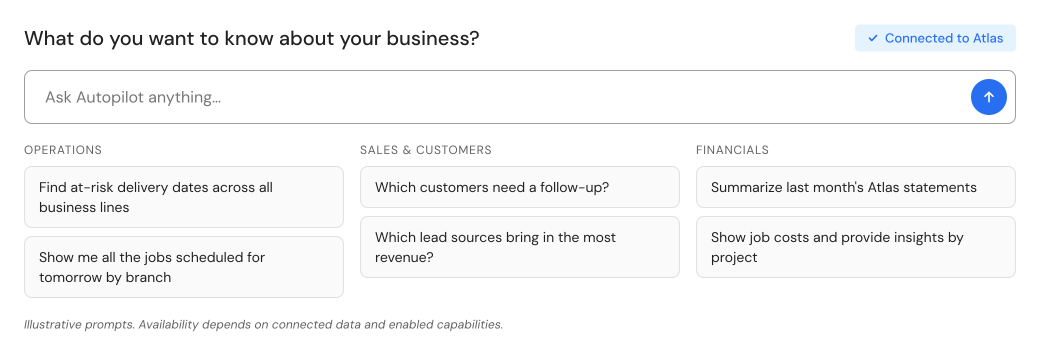
Autopilot turns plain-English questions into answers, reports and automated actions across your Sirva and independent business, while your team stays in control of key decisions.
Ask
Answers from your data, including invoice and project audits.
Insights
A question becomes a saved report, emailed on a schedule.
Claims
Intake, photo follow-up and triage, with your team approving.
Operations
Confirm details, flag gaps and keep jobs moving.
Crews
Day-of updates and job paperwork for your crews.
Accounting
Overdue-invoice reminders and billing issues flagged for review.
The next era of moving
isn't just connected.
It's intelligent.
Bring an Atlas order number. We'll show you the import, your Atlas and independent jobs in one place, and Autopilot working on them.
*Supermove's Atlas integration supports leads, orders, documents and statements. Imported Atlas orders become Supermove projects that work with Autopilot. Autopilot Insights is enabled per company and uses Autopilot credits. Some agents shown are in development. Product views are illustrative; functionality depends on available data, configuration and enabled workflows.